Frequently Asked Questions
If the answer you are looking for is not answered below, please visit our forum and ask.
Gen-E™
Q: What is Gen-E™?
A: Gen-E™ is Portable Electronics Ltd's trademark for our Android products.
Q: How do I obtain firmware updates?
A: We will release firmware for free download on all of our Gen-E™ products on this site as soon as they are available.
Q: Do you offer any warranty?
A: Yes, we will offer one year global warranty, subject to our terms and conditions.
Q: Do you sell complimentary accessories?
A: Yes, we offer complimentary accessories for purchase together with or without the product.
Q: Would you ship internationally?
A: Yes, we will ship our products anywhere in the world that the courier can reach.
Android OS/Emulator
Q: Why would I want to use Android?
A: Android is posed to be the revolutionary operating system in the mobile space in the coming years, bringing innovations and not possible in other mobile platforms. Smartphones that runs Android OS accounts for 22.7% of the total smartphones sold in 2010, an 888.8 percent growth (Statistics from Gartner) and it is expected to grow at more than twice the rate of its competitors (Canalys' prediction). Android tablets, another rising star are expected to account for 32.5% of the tablet market in 2011 and its market share is expected to increase in the following years, dominating the sector (eweek reports). The ability to easily install 3rd party applications and games on your Android device brings potentials which was not previously available possible in standard mobile phones, MID, tablet, mp3, mp4 and PMP players which run proprietary operating systems. With thousands of applications to choose from, 150,000 title as of February 2011 (Google CEO, Eric Schmidt reports) while 66% being free of charge (reported by LookOut), there is no reason that you shouldn't consider buying devices that run Android. For more information about Android, android-dls.com has a comprehensive FAQ about Android.
Q: Can I get try the Android OS before I buy any Android device?
A: Absolutely, one of the way to try out Android is to download the Official Android SDK containing the emulator from Google. You can find instructions on installing and setting up the SDK here. the The default Android OS is kinda boring, so don't forget to install 3th party games and applications to try on it. The emulator doesn't come with Android market, where you can download and install 3rd party applications. So you would need to download applications from either the developer's web site or non-Google Android markets. You can find a list of them here. Before you find or ask for help, be sure to read the comprehensive documentations provided by Google on the Android developer web site first. If you aren't tech savvy and can't be bothered with the SDK, our suggestion is for you to walk into one of the Telco or mobile phone's store and ask them to get you a demo unit of some smartphone running Android OS, so you can get a feel of it. If you live in Auckland, New Zealand or Melbourne, Australia, you may also contact us to make an appointment to see us, so that you can try our Android device before you buy.
Q: Can I change the look of the Android emulator?
A: Absolutely, there are many Android skin you can download from Tea Vui Huang.
Android applications/games
Q: What sort of Applications and games are available on Android? and where can I get them?
A: The winners from the Android Developer Challenge (ADC) I, Android Developer Challenge II and ADC Sub-Saharan Africa are a good indications of the innovative applications and games that you will find on the Android platform. If you did not notice, many of these applications are ONLY available on Android and many more are being ported from Iphone. There are many Android application stores operated by different companies at the moment, the largest being the Android Market operated by Google. If you are looking for alternative Android markets, you can find a list of them here. Feel free to browse through these app store and see what applications you can possibly use on our Android tablet.
Q: Why I can't find some applications on the Android market using the tablet?
A: Due to filtering by Android market, for some unknown reason, some applications cannot be found using the Market installed on our Gen-E tablet. The only workaround we know is to use your other Android device, if you have one to install it, then use an application manager to backup that application to the SD card, copy it to the Gen-E tablet and then install on it. If you don't have another Android device to use and you are trying to install a FREE application which you can find on the Market using the web/pc interface and would like to install it, drop us a e-mail and we will help you out.
Q: How can I use the front camera for video conference application?
A: To change the default camera that your application uses, open the default camera application, switch it to the camera you want your application to open by default and close the default camera application. When you open other application, e.g. video conference applications, it will now uses the camera you have just selected as the default.
Hardware features
Q: Where can I download sample photo and video taken with Gen-E N701 tablet's 3.2MP back camera and 2MP front camera?
A: Download sample photo taken with the Gen-E's back camera links in the following table.
| Gen-E N701 | Front Camera | Back Camera |
| Photo | Scene1 - flower at close range | Scene1 - flower at close range |
| Scene2 - plant at normal range | Scene2 - plant at normal range | |
| Scene3 - plant at normal range | Scene3 - plant at normal range | |
| Scene4 - words on paper at close range | ||
| Video | Scene1 - road traffic | Scene1 - road traffic |
| Scene2 - indoor using Gen-E tablet |
Q: What is the difference between resistive and capacitive touch screen?
A: In short, resistive touch screen requires one to apply pressure on the screen whereas capacitive does not. The Android OS is primarily design to be used with capacitive touch screen and the majority of the Android devices sold uses capacitive touch screen. For more detailed explanations, please read the explanation from helloandroid.com.
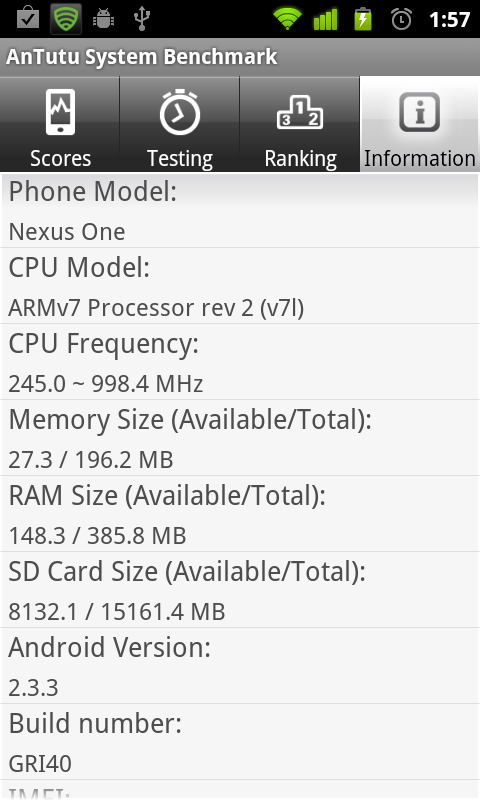
Q: Using system information applications, why is the device only showing that it has about 380MB of total ram when it is advertised as 512MB?
A: The total amount of ram reported is the total amount available to applicatons, the "missing" ram are actually being used by the operating system, wcdma/gsm module, etc. You can see all Android devices do have "missing ram", in the Nexus One screenshot below, the AnTutu only reports that the Nexus One have 385.8MB available when HTC's specification says 512MB.
Customization/Tips
Q: How can I charge the unit's battery using the least amount of time?
A: After the unit is connected to the DC wall charger or USB port, turn off the unit. You won't see any charging indicator but it is actually charging. Charging the unit when it is turned off is much faster than if you leave it on.
Q: How can I maximize battery life if I mainly use WIFI but don't use 2G/3G on this hardware?
A: Long press power button -> turn on airplane mode; or open the phone dialer, press *#*#4636#*#*, then press phone information and press "Turn off radio". Performing either action will turn off your GSM 2G/3G radio, significantly increasing battery life without affecting WIFI internet usage. If you aren't even using WIFI internet at all, you should turn off WIFI as well to further increase battery life. Turning off your GPS can also help increase your battery life when you are not using it as some background application may request GPS location without your knowledge.
Q: I don't like the default on-screen keyboard, can I change it?
A: Yes, you can download many 3rd party keyboards (aka IME). To enable downloaded keyboards, go to settings -> Language and Keyboard -> Scroll down, tick and enable the keyboard you want to use. To change your keyboard when you are typing a message -> Long press on the input field -> input method -> Select your keyboard. For a video deomstration, click here.
Q: How do I add/remove widget from the homescreen?
A: To add widget, Long press on home screen -> Select "Widgets." -> Choose your widget from the list. To remove widget, Long press on the widget -> Drag it to the garbage can (i.e. the same process as removing application shortcuts). For a video deomstration, click here.
Q: How do I get root access on the Gen-E tablet?
A: By default, you don't have root access. To get root access, you can install an application called z4root from XDA which will allow you to get temporary and permanent root permission. For z4root v1.3, temproary root does not work but permanent root does. Note: we have the right to refuse any damage caused as a result of rooting and assoicated operations.
Q: How do change the language of the user interface?
A: To change the language of the user interface, follow the instructions below.

Step 1: At the homescreen, press the MENU button to bring up the six options shown above. Press the Settings option.

Step 2: Scroll to and select the Lanuage & keyboard option.

Step 3: Press the Select Lanuage option.

Step 4: Scroll down and select the language you want for the user interface.